FAQS
How to sign up for Digital Metering
If is the first time that a user access to Digital Metering, it is necessary:
- Click on “Register”,
- Add an “Email” and confirm that “You are not a robot”.
- Next, the following message is displayed on the screen: “A verification email has been sent to the following address”.
- Then a verification email will be sent to the informed email in order to "Complete Registration".
How to reset the password
If a user who is already registered, does not remember the password:
- After entering username (email) and clicking on "Next", update the password by clicking on the option: "Have you forgotten your password?".
- Varify that it is not a robot and then the user will receive an email.
Status and Substatus
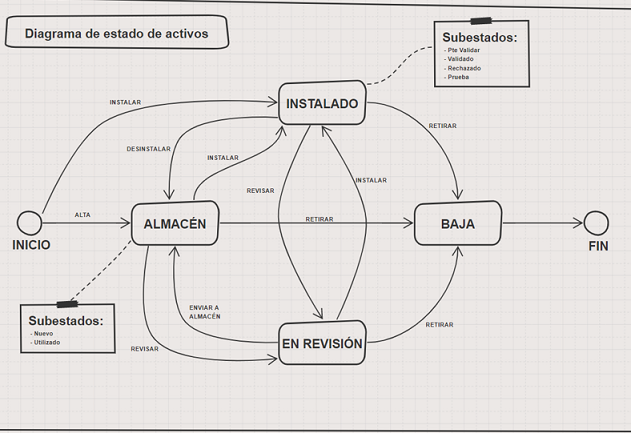
The status and substatus that a device (transmitter, meter or device) can have during its life cycle:
Status:
- Warehouse: device loaded in the system but not installed in a SP. In that case of a device, it may or may not be associated with a meter and vice versa.
- Installed: device loaded in system and installed in a SP. In that case, the device is associated with a meter and will have a SP and contract (among other commercial data).
- Withdrawn: device withdrawn because it has reached its end of useful life and will not be used again.
- Under review: designed for devices that you want to track and observe their behavior.
Substatus:
A device in Warehouse status can have the following substatus:
- New: New device uploaded to the system.
- Used: device uninstalled from a supply point that will be reused later.
A device in Installed status can have the following substatus:
- Pending validation: it is recommended to review the data with which the device has been installed.
- Validated: the data related to the installation has been reviewed.
- Rejected: the data related to the installation is not correct and it is necessary to change it.
- Test: designed for devices installed in test mode.
A Device can go from Warehouse status to: Installed, Withdrawal and Under review. A device in warehouse status can be in substatus: New or Used.
A Device can go from Installed status to: Warehouse, Withdrawal or Review. A device in Installed status can be in substatus: Pending Validate, Validated, Rejected, Test.
A Device can go from Review status to: Warehouse, Withdrawal; Installation.
How to create Groups:
By selecting this button, the user can create a new Group or select an existing one. To create a new one:
- Write the name of the group in the box where "Grouping" is written.
- Press "Enter".
- Select the "Save" button.
Load using templates:
How to load Transmitters:
This video explains how to: upload a transmitter in installed status:
How to load a Device (VHF) in Warehouse status
This video explains how to add a VHF device in warehouse status:
How to load a Device (VHF) in Installed status
This video explains how to add a VHF in installed status:
Maximum consultable period
From Consumption screen, the maximum consultable period depends on consumption type selected:
- Daily: the maximum range of data to consult is 24 months. We talk about time window not data depth. For example, if there is consumption from January-2018, we can make a consumption query from January-2018 to January-2020
- Intraday: the maximum range of data to consult is 2 months.